ERP Implementation Challenges (And How IT Consultants Help You Solve Them)

in Employer Insights

ERP systems sit at the center of how modern organizations operate.

Finance, operations, HR, supply chain—everything depends on accurate data moving smoothly across teams.

That’s also why ERP projects tend to feel heavier than expected.

The challenge usually isn’t commitment or effort. It’s complexity. Enterprise application initiatives demand specialized expertise, tight coordination, and sustained focus—often when internal teams are already stretched thin.

This is especially true for organizations trying to move ERP initiatives forward without adding permanent headcount.

That’s where IT consultants play a critical role. Not as replacements for internal teams, but as focused, experienced partners who reduce disruption and uncertainty.

Why ERP Initiatives Break Down — and How IT Consultants Help

Initiatives at this scale rarely fail for a single reason. Most often, they break down due to expertise gaps, limited internal capacity, unclear ownership, and execution risk during critical project phases.

Specialized ERP Expertise Is Missing

ERP systems touch nearly every part of the organization, but few internal teams have deep, hands-on experience across multiple implementations or upgrades.

Without that exposure, teams often learn in real time, slowing progress and increasing risk. IT consultants bring prior ERP experience that helps organizations anticipate issues, make informed decisions earlier, and avoid unnecessary rework.

Internal Teams Hit a Capacity Wall

Even highly capable teams struggle to maintain momentum on ERP initiatives while managing day-to-day operations.

Work doesn’t pause when other priorities surface. Experienced IT consulting partners provide focused support during critical phases, helping projects move forward without pulling internal teams away from their core responsibilities.

Flexibility Matters During Critical Project Phases

ERP projects rarely require the same level of effort from start to finish. Certain phases demand additional expertise or temporary increases in workload.

IT consultants offer flexible, project-based support that scales up or down as needed, helping organizations meet peak demands without overextending internal teams or committing to long-term resources beyond the project.

ERP Projects: Internal Teams vs. IT Consultants

These challenges often surface when ERP initiatives rely solely on internal capacity. In many cases, the difference between stalled and successful projects comes down to how work is supported during critical phases.

Relying Only on Internal TeamsPartnering With IT Consultants
Limited exposure to multiple ERP implementationsExperience across similar ERP environments
ERP work competes with day-to-day responsibilitiesDedicated focus on defined project phases
Fixed team sizeScalable support as project needs change
Higher risk of delays during peak phasesFaster execution during critical milestones
Knowledge concentrated among a few individualsKnowledge sharing and documentation built in

Delays Increase Business Risk and Cost

Delays can ripple across the business, impacting operations, reporting, leadership confidence, and decision-making.

Experienced IT consultants help teams maintain momentum by working efficiently within defined scopes. Their familiarity with ERP project cycles often leads to shorter timelines and fewer costly surprises along the way.

Unclear Project Ownership

ERP initiatives involve multiple stakeholders, systems, and dependencies. Without clear ownership and coordination, projects can lose direction quickly.

IT consultants with ERP project experience help bring structure, accountability, and clarity—keeping teams aligned and initiatives moving toward measurable outcomes.

Support Doesn’t End at Go-Live

ERP systems don’t stop evolving after go-live. Organizations often need continued support to stabilize, refine, and adapt systems as business needs change.

IT consultants can step in post-launch, helping internal teams maintain performance without overextending existing resources.

Managing Risk During Implementation and Change

ERP initiatives carry inherent, execution-related risks that typically surface during system changes, integrations, and transitions.

Consultants who have worked through similar projects help organizations identify potential risks earlier and put safeguards in place, reducing uncertainty and protecting business continuity.

Expert ERP Support Without Long-Term Overhead

ERP success isn’t about adding more people. It’s about having the right expertise at the moments it matters most.

IT consultants help organizations navigate ERP complexity by providing focused experience, flexible support, and clear project ownership—without requiring long-term hiring commitments. When internal teams are supported by the right consulting partners, ERP initiatives move faster, risks are easier to manage, and long-term value is easier to sustain.

Organizations that pair internal leadership with experienced enterprise application consultants are better positioned to execute initiatives efficiently while reducing risk and disruption.

If you’re evaluating how to move an ERP initiative forward with confidence, the right consulting approach can make all the difference.

Explore how Artemis supports ERP initiatives with experienced IT consultants.

ERP & IT Consulting FAQs

When should organizations consider IT consultants for ERP projects?

When ERP initiatives require specialized expertise, tight timelines, or focused attention that internal teams can’t realistically maintain alongside their regular responsibilities.

Are IT consultants only used during ERP implementation?

No. Organizations often rely on consultants for upgrades, integrations, optimization initiatives, and post-launch stabilization.

How do IT consultants support internal ERP teams?

By filling expertise gaps, managing defined project phases, and transferring knowledge so internal teams are better equipped long-term.

Is working with IT consultants more cost-effective than hiring internally?

In many cases, yes—especially for short-term or specialized ERP needs where permanent hires would create long-term overhead.

Do IT consultants replace internal ERP ownership?

No. Successful ERP projects still require internal leadership. Consultants provide targeted support to strengthen—not replace—internal ownership.

Avoid These 5 Pitfalls in Your SAP S/4HANA Migration

in Employer Insights

Migrating to SAP S/4HANA is one of the most significant moves an enterprise can make.

On paper, it looks like a clear upgrade: modern functionality, better performance, and the chance to simplify your technology landscape.

The reality is that S/4HANA migration is rarely straightforward.

In fact, many companies run into serious roadblocks not during planning, but after the project has started. From underestimated data cleanup to user resistance, the hidden pitfalls of migration can derail timelines, inflate costs, and strain internal teams.

The good news? These challenges are avoidable…if you know where to look.

Here are five roadblocks we see companies run into again and again—and how to move past them with the confidence of an implementation team walking into go-live with clean data.

Why SAP S/4HANA Migration Is More Complex Than It Looks

On the surface, migrating to S/4HANA may appear similar to a standard ERP upgrade. But the scope is far bigger.

S/4HANA migrations involve terabytes of historical and transactional data, integrations across finance, supply chain, HR, and compliance systems, and the delicate task of aligning both IT teams and business stakeholders.

That’s why it’s often described as a business transformation project rather than just a technology upgrade. When companies underestimate that distinction, they fall into the traps below.

magnifying glass highlighting data cleanup and migration

Pitfall #1: Data Cleanup and System Readiness in SAP S/4HANA Migration

One of the most costly mistakes is assuming existing records are “good enough.”

Once migration begins, data errors multiply, compliance risks escalate, and reporting becomes unreliable. What should have been a smooth rollout quickly turns into weeks of rework.

What to Watch For

Duplicate or obsolete records surfacing late in the project, mismatched data between business units, or legacy systems that haven’t been updated in years.

These red flags signal that your migration is likely to stall without a dedicated cleanup effort.

How to Avoid It

Treat data cleanup as its own project phase. Build in time to audit, validate, and standardize records well before migration begins.

Running test migrations can help expose hidden issues early.

frustrated team sitting around table

Pitfall #2: Misaligned Stakeholders and Poor Communication

Another frequent pitfall is treating migration as an IT-only initiative.

When finance, operations, and compliance leaders aren’t brought in early, they may resist changes or push for late-stage adjustments that derail timelines.

The result? Scope creep, confusion about responsibilities, and frustration across departments.

What to Watch For

Business units pushing back late in the project, disagreements over reporting requirements, or confusion about who owns key decisions.

These red flags often point to misalignment between IT and finance or operations.

How to Avoid It

Establish a cross-functional steering committee from the start. Define clear ownership for each migration stage, set realistic milestones, and keep communication channels wide open. Over-communication beats finger-pointing every time.

In one ERP consolidation and systems integration project, Artemis helped a client avoid this scenario by establishing a cross-functional steering committee early, ensuring expectations were clear and costly rework was avoided. 👉 Read the case study

change management training

Pitfall #3: Treating Change Management as an Afterthought

Even if the migration is technically flawless, adoption can still fail.

Without proper change management, productivity drops, users fall back on old processes, and the ERP project’s ROI erodes.

What to Watch For

Employees relying on workarounds, feedback that training feels irrelevant or too late, or resistance surfacing during pilot testing.

These are early signs adoption risks will compound after go-live.

How to Avoid It

Change management should be built into the migration timeline from the start. Identify “super users” in each department, invest in phased training, and create feedback loops so employees feel supported, not blindsided.

A lock and shield overlayed with regulatory acronyms (GDPR, HIPAA, SOX).

Pitfall #4: Underestimating Compliance and Regulatory Risks

S/4HANA migration impacts processes that are highly regulated—finance, HR, supply chain, and more. When compliance is overlooked, companies expose themselves to audit failures and fines.

What to Watch For

Gaps in audit documentation, unclear ownership of compliance requirements, or assumptions that existing controls will “carry over” without testing.

If compliance officers aren’t engaged early, expect headaches during audits and potential regulatory penalties after migration.

How to Avoid It

Engage compliance officers and auditors early in the project. Document every change, map processes against regulatory frameworks, and ensure test scenarios account for audit requirements.

concerned support employee after erp migration

Pitfall #5: Post-Go-Live Support and Hidden Costs of SAP S/4HANA

Finally, when organizations treat go-live as the finish line, the hidden costs start piling up. Rework, emergency fixes, and mounting user frustration can erode ROI within months.

What to Watch For

A spike in support tickets, users creating shadow processes, or sluggish system performance in the first 90 days.

These early indicators reveal that post-migration optimization wasn’t adequately planned.

How to Avoid It

Develop a structured post-migration support plan with clear ownership. Monitor system performance, prioritize quick fixes, and commit to continuous improvement over time.

team high fiving after successful erp implementation

Preparing for Success

The real lesson in these pitfalls is that SAP S/4HANA migration succeeds when organizations prepare their people and processes to manage complexity at every stage—from planning through post-go-live.

Successful companies take steps like:

  • Auditing and standardizing their data early.
  • Aligning stakeholders across departments.
  • Investing in user adoption and training.
  • Building compliance checks into their migration plan.
  • Treating post-go-live as a new phase of optimization.

From Pitfalls to Payoff

SAP S/4HANA migration is full of roadblocks, but the payoff is reaching the other side with greater efficiency, stronger insights, and a platform built for future growth.

The companies that succeed aren’t the ones that never face challenges. They’re the ones that anticipate pitfalls, prepare their people and processes, and surround themselves with the right expertise to guide the journey.

And that’s exactly why clients call Artemis.

We help businesses move beyond the checklist approach to migration and build strategies that avoid costly missteps, accelerate adoption, and maximize long-term value.

👉 Explore our Enterprise Application Consulting to see how we can help your organization turn S/4HANA migration challenges into lasting business outcomes.

SAP S/4HANA Migration FAQ

What are the common pitfalls of SAP S/4HANA migration?

The most common pitfalls include poor data quality, misaligned stakeholders, low user adoption, overlooked compliance risks, and lack of post-go-live support. These challenges often lead to delays, unexpected costs, and frustrated teams if not addressed early.

How do you prepare data for SAP S/4HANA migration?

Start by auditing and standardizing your data well before migration begins. Validate records, eliminate duplicates, and run test migrations to uncover issues early. Treat data cleanup as a dedicated project phase—not just a task on the checklist.

What is the hardest part of SAP S/4HANA migration?

The hardest part is balancing technical execution with people and process readiness. Even if the system is migrated correctly, poor change management or weak compliance planning can erode adoption and ROI.

What are the hidden costs of SAP S/4HANA migration?

Hidden costs often include unexpected data remediation, extended user training, additional support resources, and compliance-related fixes. These costs can accumulate quickly if the project is treated as “finished” at go-live without a structured optimization plan.

Who is the best consulting partner to help with SAP S/4HANA migration?

The best consulting partner is one that combines deep SAP expertise with practical change management, compliance knowledge, and post-go-live support.

At Artemis, we align with these best practices by providing expert consultants who help organizations anticipate migration pitfalls, align IT and business stakeholders, and sustain adoption long after cutover. This balanced approach ensures that your S/4HANA migration delivers measurable business outcomes—not just a completed system upgrade.

On-Premise, Cloud, or Hybrid? Deciding the Right SAP S/4HANA Deployment for Your Business

in Employer Insights

Upgrading to SAP S/4HANA is a major milestone in your enterprise application services strategy—but it’s not just about the technology.

From choosing between on-premise, cloud, or hybrid ERP deployment models to evaluating broader transformation offerings like RISE with SAP, the decisions you make now can shape your business’s ability to grow, scale, and stay secure for years to come.

Whether you’re in manufacturing, healthcare, finance, or retail, your ERP deployment strategy should reflect your IT infrastructure, compliance requirements, and long-term digital transformation goals.

So which SAP S/4HANA deployment model is right for your business? Let’s walk through your options.

What About RISE with SAP?

If you’ve been exploring SAP solutions, you’ve likely come across RISE. Think of RISE as a bundled offering that helps accelerate cloud transformation by combining SAP S/4HANA with the tools, services, and support to simplify migration and improve performance.

But here’s the key: RISE isn’t a deployment model; it’s a flexible framework. You’ll still need to choose the right environment for your business: public cloud, private cloud, on-premise, or hybrid.

The rest of this article helps you weigh those options based on your infrastructure, compliance needs, and goals.

SAP S/4HANA Deployment Options: On-Premise vs. Cloud vs. Hybrid

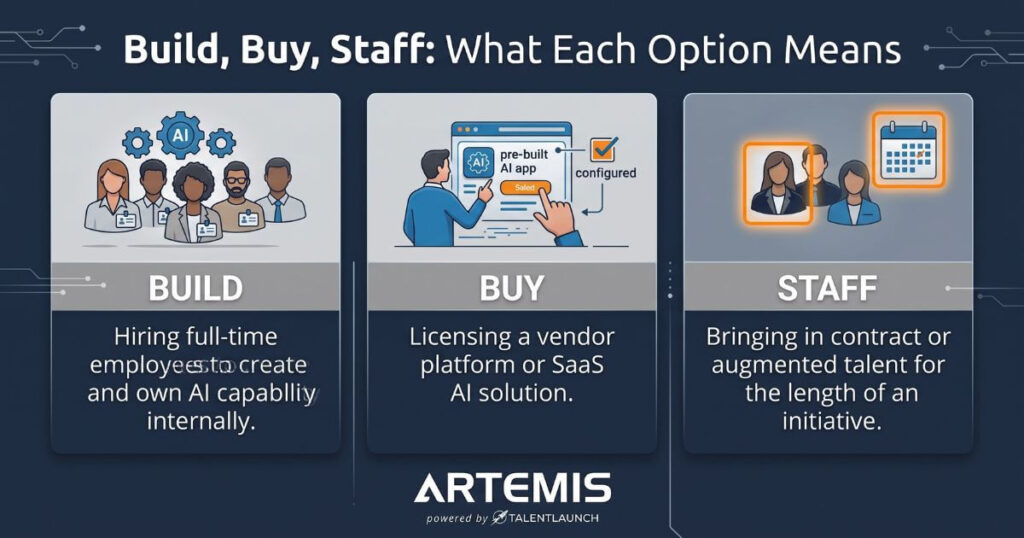
1. On-Premise Deployment

SAP S/4HANA is installed on your own servers, giving you full control over updates, customizations, and infrastructure.

  • Best for: Highly regulated industries (like healthcare and finance), businesses with heavy customization needs, or those with existing IT investments.
  • Cost: Higher upfront investment in servers, licenses, and IT support.
  • Scalability: Limited by your hardware; scaling requires physical upgrades.
  • Compliance: Easier to manage internally, especially for strict data governance.

2. Cloud Deployment

Your ERP is hosted by SAP or another cloud provider like AWS or Azure. This deployment offers faster implementations, lower infrastructure overhead, and greater flexibility.

It’s also a common component of RISE, which bundles S/4HANA Cloud with tools and services to support broader business transformation.

  • Best for: Companies seeking flexibility, faster innovation, and reduced CapEx.
  • Cost: Subscription model with predictable OpEx. Fewer in-house resources needed.
  • Scalability: Extremely high—you can adapt to demand quickly.
  • Compliance: You share responsibility with the provider. Check certifications and SLAs carefully.

Need help navigating SAP in the cloud? Our Cloud Consulting Services team works with you to assess readiness, choose the right cloud environment, and support a secure, scalable deployment strategy.

3. Hybrid Deployment

Not quite ready for a full cloud migration? A hybrid ERP model gives you the best of both worlds, preserving legacy systems while modernizing where it matters most.

  • Best for: Enterprises with legacy infrastructure, compliance variability, or a phased digital strategy.
  • Cost: More complex but flexible. Can extend ROI on existing investments.
  • Scalability: Moderate; scales faster than on-prem but slower than full cloud.
  • Compliance: Sensitive workloads stay in-house while less critical functions leverage the cloud.

How to Choose the Right Deployment Model

So…how do you decide between on-premise and cloud for SAP S/4HANA?

It depends on your industry, compliance needs, existing systems, and business goals. Here’s a simple decision framework to help guide you:

Choose On-Premise if:

  • You have strict data residency or compliance requirements.
  • You’ve already invested in on-premise infrastructure.
  • Your ERP is heavily customized and difficult to migrate.

Go Cloud if:

  • You need scalability, faster deployment, and lower maintenance costs.
  • Your business model demands agility and frequent updates.
  • You lack the internal IT resources to manage on-prem systems.

Consider Hybrid if:

  • You want to modernize at your own pace.
  • You need to balance cloud innovation with legacy stability.
  • Your organization is large, global, or spans multiple compliance frameworks.
  • You’re using RISE with SAP and want flexibility between cloud and legacy systems.

Industry-Specific Deployment Trends

Manufacturing & Consumer Goods

Leaning into hybrid S/4HANA deployments, manufacturers often keep plant-floor systems on-premise while migrating analytics or supply chain modules to the cloud.

Retail & CPG

Retailers need agility, especially during peak seasons and sudden demand spikes. That’s why many are going cloud-first to stay nimble and competitive.

Healthcare & Insurance

Compliance often favors private cloud or on-premise systems for core applications, while hybrid models enable secure innovation in patient experience or customer portals.

Financial Services

Security and auditability remain key. Many choose SAP S/4HANA private cloud deployment to strike a balance between control and modernization.

For financial institutions evaluating broader transformation strategies, RISE with SAP can also offer a structured, compliance-ready path backed by bundled services and support.

Curious how companies like yours transition to S/4HANA and ensure post-go-live ROI? Read our blog: Beyond Go-Live: Maximizing ROI from Your SAP S/4HANA Investment

Why Hybrid ERP Deployments Are on the Rise

Not every company is ready to go all-in on cloud—and that’s okay.

Gartner predicts that by 2027, 90% of midsize enterprises will have adopted a hybrid ERP strategy. More than just a hedge; it’s a deliberate path that balances continuity with modernization.

What are the benefits of SAP S/4HANA hybrid deployment?

  • Migrate in phases, not all at once.
  • Keep critical legacy systems operational.
  • Test cloud modules in real-world use cases.
  • Gain cloud benefits without overhauling everything overnight.

For many companies, hybrid isn’t just a stopgap. It’s a smart, flexible strategy that supports long-term transformation without forcing an all-or-nothing decision.

Fun Fact: Artemis’ Business Intelligence & Analytics team often supports clients using hybrid models to bring real-time insights into cloud-hosted platforms.

Final Thoughts: Make ERP Work For You, Not Against You

No matter which deployment model you choose, your ERP implementation strategy should align with business goals, not just IT preferences.

Whether you’re optimizing for compliance, scalability, or speed—or rolling out S/4HANA as part of a RISE with SAP strategy—working with an experienced partner ensures your deployment becomes a growth driver rather than a frustrating roadblock.

Let’s work together to build a roadmap that fits your business, on your terms and timeline.

Need help mapping the right strategy?

From enterprise application consulting to SAP strategy, Artemis can help businesses like yours design ERP deployments that perform today and scale for tomorrow.

Contact us to talk through which SAP S/4HANA deployment model aligns with your goals.

Beyond Go-Live: Maximizing ROI from Your SAP S/4HANA Investment

in Employer Insights

So you’ve completed your SAP S/4HANA migration. Now what?

First, a hat tip to you because completing that transition is no small feat. With SAP’s 2027 deadline for transitioning from legacy systems fast approaching, many companies like yours have prioritized making the switch to stay competitive and supported.

But here’s the truth: the real work — and the real payoff — starts after you’ve gone live.

That’s because migrating to SAP S/4HANA isn’t just a system upgrade; it’s an opportunity to completely transform how your business operates. Better. Faster. Smarter. And it’s about unlocking powerful solutions that drive growth.

However, many companies fail to fully leverage the platform’s capabilities, leaving valuable benefits on the table.

But we suspect you’re here because you don’t want to be one of those companies. That’s why we created this guide to show you how to maximize the return on your SAP S/4HANA investment by moving beyond implementation to optimization.

IT team reviewing predictive analytics on large monitors

Leverage Advanced Features for a Competitive Edge

SAP S/4HANA is built to handle the complexities of modern business with features that go far beyond basic enterprise application functionality. Yet, many companies only scratch the surface of its potential.

The companies who dive deeper will unlock advanced capabilities that can transform their business operations in the following ways:

  • Predictive Analytics: Take advantage of embedded AI and machine learning to forecast trends, optimize inventory, and improve decision-making in real-time.
  • IoT Integration: Tap into Internet of Things (IoT) data to monitor equipment, streamline manufacturing, or enhance supply chain visibility.
  • Digital Boardrooms: Equip leadership with interactive dashboards that display live business data, enabling agile decision-making.

Next Steps: Make a plan to explore and implement these features after go-live. Assign teams to pilot initiatives and measure the impact before rolling them out broadly.

ai projection of 3d roi metrics on tablet

Measure ROI: Set the Right Metrics

One of the biggest challenges post-ERP migration is understanding whether the investment is paying off. Define clear metrics to track the success of your S/4HANA implementation, such as:

  • Cost Savings: Monitor reductions in IT maintenance costs, process inefficiencies, and system downtime.
  • Operational Efficiency: Measure cycle times, order fulfillment rates, and other performance indicators specific to your industry.
  • User Adoption Rates: Evaluate how effectively employees are using the system to perform their roles.

Next Steps: Set benchmarks early and review them regularly to ensure your system delivers measurable value.

it consultant reviewing workflows on laptop

Tailor Workflows to Match Business Goals

Every organization is unique, and SAP S/4HANA offers the flexibility to customize workflows to fit your specific needs. Post-migration is the perfect time to re-evaluate your processes and make adjustments that align with your strategic goals:

  • Review existing workflows to identify inefficiencies or redundancies.
  • Leverage S/4HANA’s tools to automate routine tasks, such as invoice processing or supply chain tracking.
  • Work with your IT and functional teams to refine processes that maximize the system’s capabilities.

Next steps: Identify key workflows to evaluate and adjust. Focus on automating repetitive tasks to boost productivity and create a system that evolves with your business.

sap s 4hana employee training session

Continuous Optimization: Keep the Momentum Going

Your SAP S/4HANA system isn’t static, and neither is your business. Post-migration, it’s essential to keep refining and optimizing:

  • Feedback Loops: Set up regular touchpoints to gather user feedback on the system and identify areas for improvement.
  • Employee Training: Offer ongoing training to ensure employees are confident using advanced features and new workflows.
  • System Audits: Conduct periodic system health checks to ensure optimal performance and security.

Next steps: Form a cross-functional team to champion these efforts, ensuring your investment continues to deliver long-term benefits.

it consultant meeting with company leaders

Don’t Go It Alone: Partnering for Success

Maximizing ROI from your SAP S/4HANA migration takes functional expertise, time, and a commitment to continuous improvement. Many organizations find that working with experienced enterprise application consultants helps them go further, faster.

At Artemis, we specialize in connecting companies with expert consultants and delivering IT solutions to optimize ERP implementations and beyond. Whether you’re eager to explore advanced features, tailor workflows, or track measurable ROI, we’re here to help you turn your capital projects into long-term success stories.

Ready to take your SAP S/4HANA system to the next level? Let’s build a partnership that works as hard as you do.

Overcome Hiring Freezes with Experienced IT Consultants: 3 Actions To Take Right Now

in Employer Insights

Hiring freezes are often necessary. They help organizations manage risk, control costs, and buy time when conditions feel uncertain.

What they don’t do is eliminate the need for progress.

Critical IT initiatives don’t pause just because headcount is on hold. Systems still need support. Projects still have deadlines. And internal teams are often asked to do more with less—right when the margin for error is smallest.

For organizations trying to move forward without adding permanent staff, experienced IT consultants can provide a practical path through the freeze.

Hiring Freezes Are Meant To Slow Hiring, Not Halt Progress

A freeze limits how you grow your team, but it doesn’t change the business realities you’re operating in. Delaying IT initiatives can create downstream risk, from operational slowdowns to missed opportunities.

At the same time, making permanent hires during uncertain conditions may feel like a step too far.

That tension is where consulting-led support becomes especially valuable.

During a hiring freeze, IT consultants help organizations keep critical projects moving by providing project-based expertise, protecting internal teams from overload, and reducing execution risk.

Here are three ways to keep work moving without compromising long-term flexibility.

Three Ways IT Consultants Help During a Hiring Freeze

1. Use Project-Based IT Consultants to Maintain Momentum

When hiring is frozen, the goal isn’t to fill roles. It’s to deliver outcomes.

Project-based IT consultants allow organizations to continue critical work during a hiring freeze without adding permanent headcount. These consultants integrate with your existing team for the duration of the project, contributing specialized skills exactly where they’re needed.

Instead of reshaping your org chart, you’re reinforcing your execution capacity.

This approach helps your organization:

  • Keep critical projects on track
  • Align resources to outcomes, not titles
tech worker stretching in front of laptop

2. Protect Internal Teams from Overload

Hiring freezes often increase pressure on internal teams, making focused external support critical to maintaining momentum.

Responsibilities expand, priorities stack up, and burnout becomes a real risk.

Experienced IT consultants absorb execution pressure during peak phases, allowing internal teams to stay focused on core responsibilities. Rather than stretching your people thin, you’re adding targeted support that keeps momentum steady and morale intact.

The result is forward progress without asking internal teams to carry unsustainable workloads.

3. Reduce Risk When Conditions Are Uncertain

During a hiring freeze, scrutiny tends to increase. Timelines matter more. Mistakes cost more. And rework is harder to justify.

IT consultants help reduce execution risk during a hiring freeze by bringing proven processes and specialized expertise.

Consultants who have navigated similar environments bring practical experience that helps organizations avoid trial-and-error. Their familiarity with complex projects, integrations, and system changes provides stability at a time when it matters most.

This isn’t about moving faster at all costs. It’s about moving forward with confidence.

Progress Without Permanent Commitment

Hiring freezes don’t have to stall your roadmap.

By leveraging experienced IT consultants, organizations can continue critical initiatives, support internal teams, and reduce execution risk—without locking themselves into long-term hiring decisions before the timing is right.

For leaders balancing caution with momentum, consulting-led support offers flexibility when it matters most.

Explore how Artemis supports organizations during hiring freezes with experienced IT consultants focused on outcomes, not headcount.

Hiring Freeze & IT Consulting FAQs

Can IT consultants work during a hiring freeze?

Yes. Because consultants are typically engaged on a project basis, your organization can continue critical work without adding permanent employees.

How do IT consultants help during a hiring freeze?

They provide temporary, specialized expertise that helps maintain momentum, reduce risk, and support internal teams without long-term hiring commitments.

Are IT consultants a long-term replacement for full-time hires?

No. Consultants are best used to support defined initiatives or bridge gaps until hiring resumes.

Privacy Overview

This website uses cookies so that we can provide you with the best user experience possible. Cookie information is stored in your browser and performs functions such as recognising you when you return to our website and helping our team to understand which sections of the website you find most interesting and useful.

Privacy Policy